HerMpire Digital
The Pinterest Pin Builder
The Pinterest Pin Builder
Couldn't load pickup availability
The Pinterest Pin Builder: Get Five Different Pins for One Post Without Designing Any of Them
You asked an image model for a Pinterest pin and it gave you a Canva template. Then you asked again, worded it differently, and got the same template in a different color.
The Pinterest Pin Builder was created for bloggers, digital product sellers, coaches, and content creators who are driving traffic from Pinterest and are tired of pins that look like everyone else's.
Here is what is actually going wrong. The prompt you typed was one sentence. The model filled in every choice you did not make, and what it fills in is the average of everything it has ever been shown. Average is exactly what nobody stops scrolling for.
Then there is the volume problem. One blog post needs more than one pin, so you change the background, swap the headline, and pin it again. Pinterest treats a reused image and a reworded caption as the same pin. Your second pin does not get a fresh look from the algorithm, but it does compete with your first one for the same impressions.
And the part that costs the most: the headline. The model shrinks your words down to fit whatever scene it decided to build, and now the only thing that could have earned a click is unreadable at the size people actually see it.
No more one sentence prompts and average results.
No more recoloring the same pin four times and calling it a set.
No more headlines the model shrank to fit a photo.
No more staring at a blank prompt box trying to remember the word for the look you want.
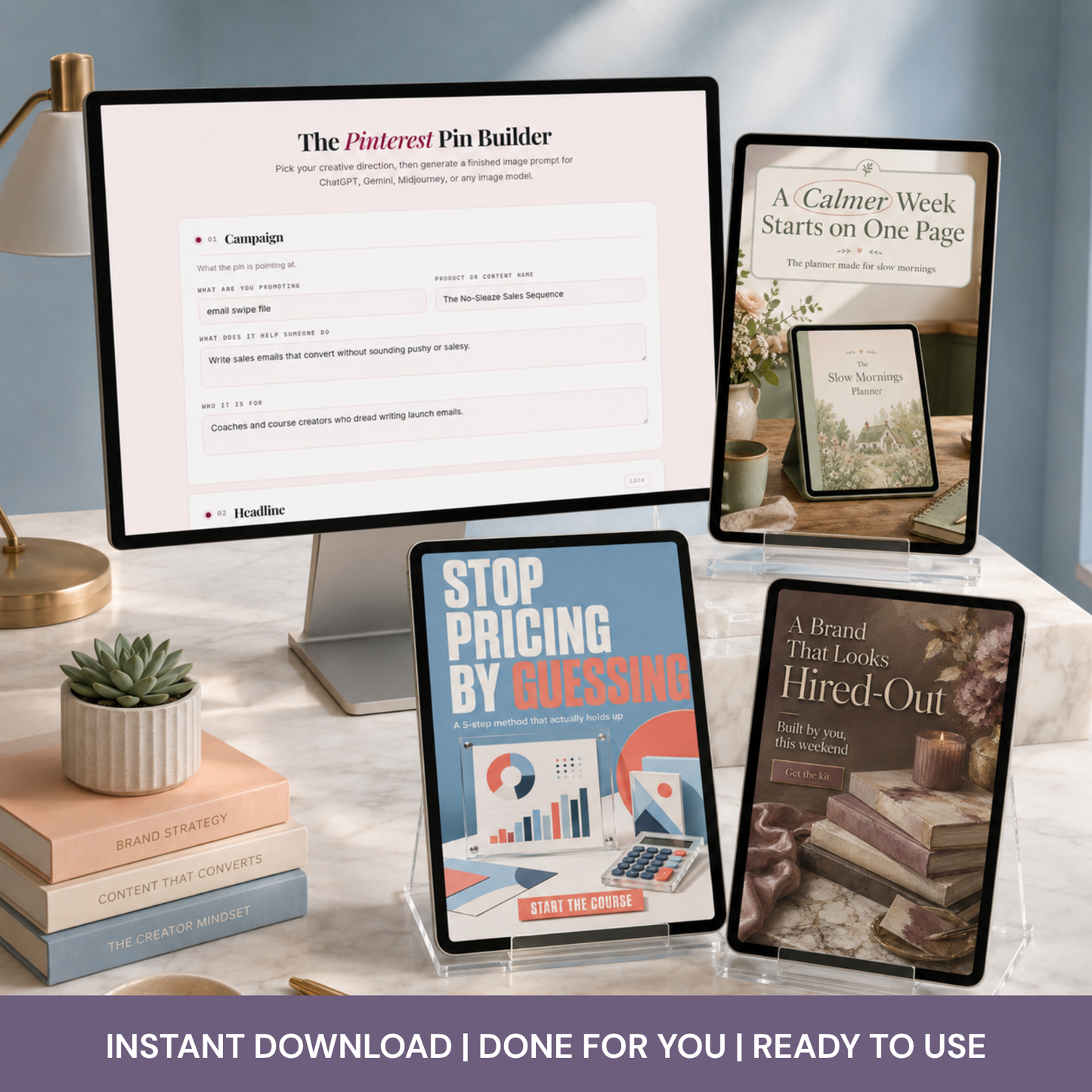
Just click through twelve sections of creative direction, press one button, and paste the finished prompt into whatever image model you already use.
💎 What You Get
A browser based tool that opens in one click, with no download, no install, and no account to create.
Twelve sections of creative direction: campaign, headline, aesthetic, palette, scene, layout, typography, light and surface, subject, people, mood, and what to avoid.
Over 250 creative options, sorted into named groups so you are choosing inside a category instead of scanning a wall of buttons.
Twenty one color palettes with visible swatches, including ten soft designer palettes and a custom option where you paste your own hex codes.
A headline variation generator that writes from the angle you selected, so a warning headline and an aspirational headline come out as genuinely different lines.
Three separate typography controls that most tools do not have at all: how big the headline runs, what it sits on, and which single word gets pulled out.
A one click five pin set that produces five distinct concepts for the same destination.
A Surprise Me button that pulls from concepts that hold together instead of rolling every field at random.
A lock on every section, so you can keep the palette and reroll everything else.
Copy and download on every prompt, plus a running list of your last twenty.
A sample PDF showing the exact selection I made in every section to produce the sample pins.
📖 The Sample Pin Breakdown
Most tools show you a finished result and leave you to reverse engineer it. This one hands you the answer key.
The PDF walks the sample pins section by section and names the actual choice behind each one. The aesthetic. The palette. The composition. Where the headline sits, how big it runs, what it sits on, and which word got pulled out. Nothing is described in general terms, because a general description is not something you can act on.
So the first time you open the tool, you are not staring at twelve empty sections wondering what a good answer looks like. You can rebuild a sample pin exactly, change one selection, and watch what that one change does to the prompt.
That is the fastest way to learn what each control is actually for, and it takes about ten minutes.
🔁 The Five Pin Set
Press one button and you get five prompts for the same blog post or product, numbered one through five.
They are not recolors. Each one changes the headline, the palette, the aesthetic, the composition, the typography, the headline scale, what the headline sits on, and which word gets emphasized.
The five concepts are built to be different kinds of thumbnail, not different shades of one: an elegant editorial poster, a clean educational layout, a conceptual or symbolic scene, a warm workspace lifestyle shot, and a bold color block graphic with no photographic scene at all.
Every prompt arrives labeled, so a downloaded file tells you which pin you are looking at.
📐 The Typography Controls
Most pin tools let you type a headline and stop there. This one directs how the headline behaves.
Scale decides whether the photograph leads, the text and image share the frame, the typography takes over, or the words run full bleed with the image dropped to a background layer.
The container decides what the words sit on: nothing, a solid color block, a translucent panel, an outlined card, torn paper, a ribbon, or a band across the whole pin.
Emphasis decides which single word gets pulled out, and how. One word in the accent color, one word in a contrasting font, one word much larger, a handwritten circle, or a highlight block behind it.
Those three choices are most of what separates a pin that looks art directed from a pin that looks generated.
🔥 Why You'll Love It
Right now you are either paying for a pin designer, wrestling with a template in Canva that a thousand other people are also using, or typing one sentence into an image model and hoping.
With this you can:
Build a finished, professionally worded image prompt in a couple of minutes.
Copy a sample pin selection by selection and make it yours by changing two things.
Get five genuinely different pins for one URL, which is what a rotation actually requires.
Keep your headline readable at the size people scroll past it.
Lock the palette you use for your brand and change everything else around it.
Use your own brand colors by pasting hex codes.
Paste the same prompt into ChatGPT, Gemini, Midjourney, or whatever you switch to next year.
Stop needing to know the vocabulary, because the tool supplies the words for the look you already had in your head.
💡 The Thing Nobody Tells You
Pinterest reads the text on your image. It also decides what counts as a fresh pin, and a fresh pin means a new image file with text that has not been used before. Recoloring one design and repinning it is the exact thing the platform stopped rewarding.
So five different pins is not a design preference. It is a distribution requirement. That is why the five pin set changes the layout and the words, not just the color.
✨ Ready to Use
Every field arrives with a working example already written in, using a fitness coach selling a home strength program, so you can see the shape of a good answer before you write your own.
The sample PDF closes the gap the examples cannot. You see a finished pin and the twelve decisions that produced it, side by side.
The negative instructions are switched on by default. Flat template layouts, tiny unreadable text, clutter, poor anatomy, watermarks, and oversaturated color are already being told to stay out of your pin. You only touch them if you want one of them back.
Pinterest sizing is built into every prompt, so the output specification never has to be remembered or retyped.
📌 How to Use It
Click the link and it opens right up in your browser. Nothing to download, nothing to install.
Open the sample PDF first and rebuild one of the sample pins by copying the selections listed for it. That is the fastest way to see what every control does.
Then fill in what you are promoting, pick your own creative direction, and press Build the prompt.
Copy the prompt, paste it into ChatGPT, Gemini, Midjourney, or any other image model, and generate.
For a full rotation, press Build a 5 pin set instead and copy all five at once.
Works on desktop, tablet, and phone.
💻 Perfect For
Bloggers driving traffic from Pinterest
Digital product sellers
Coaches and course creators
Etsy and Shopify shop owners
Newsletter writers
Content creators and virtual assistants
Anyone using AI image generation who is tired of template looking results
📦 Includes
The Pinterest Pin Builder browser tool, hosted and ready to use
Twelve sections of creative direction with over 250 grouped options
Twenty one preset color palettes plus custom hex entry
The headline variation generator
The five pin set generator
The Surprise Me concept randomizer
Section locks
Copy and download on every prompt
The sample pin breakdown PDF, showing every selection behind the sample pins
Lifetime access to the tool at your link, including future updates
📄 Usage
Your access link and the PDF are for you. Use the tool for your own business and for client work you are paid to do. Do not share, resell, or republish the link, the tool, or the PDF.
The prompts you generate and the images you create from them are yours to use commercially, with no attribution required.
🌸 Where to Learn the Rest
This tool writes the pin. It does not teach you what to do after someone clicks.
That part happens inside HerMpire Builders, where solopreneurs learn to get leads, make sales, and build recurring revenue from a digital product they build once. It is $1 per month.
A beautiful pin sends someone to a page. Whether that page turns them into an email subscriber and then a buyer is a different skill, and it is the one that decides whether the traffic was worth making.
- SSL Secure
- Heading
- Heading
What You'll Receive
What You'll Receive
You will recieve either a direct link or download to the product. Or you may received a PDF containing the links to access your product.
Resell License
Resell License
Each product has a commercial use rights attached to it. Please check the individual listing to see if they come with any additional resell licenses, such as Private Label Rights (PLR) or Master Resell Rights (MRR). PLR & MRR licenses, allows you to resell the actual item and/or rebrand it. If it doesn't say you have PLR or MRR, you cannot resell, trade, give away our actual products.
Return Policy
Return Policy
Due to the digital and instant nature of our products, returns, refunds and exchanges cannot be accepted.
Make sure to read all the information and ask all of your questions before purchasing.